
Concepts
This guide explains what you're seeing in CodeLayers and how to interpret the visualization.
The Dependency Graph
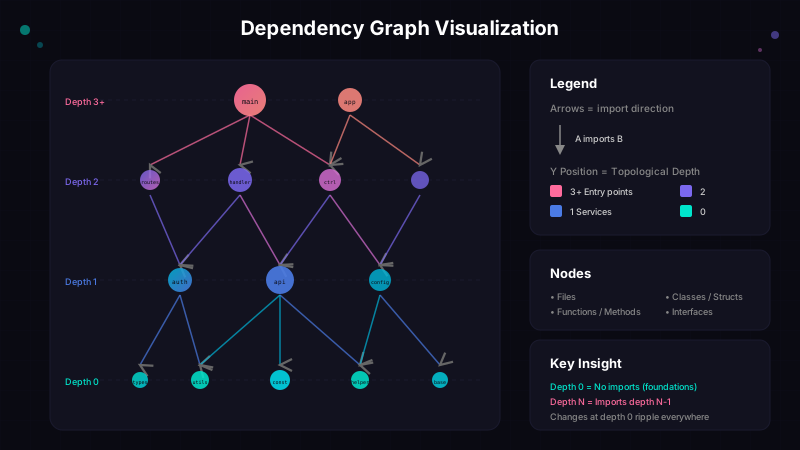
CodeLayers visualizes your codebase as a dependency graph—files connected by their relationships.
What You're Seeing
Nodes (spheres) represent files in your codebase:
- Size = Importance (how many other files depend on this one)
- Color = Depth layer (see Topological Depth below)
- Position = Organized by dependency relationships
Edges (lines) represent relationships:
- Imports (
A imports B) - Function calls (
A calls function in B) - Type references (
A uses type from B)
Larger nodes are more important—they're imported by many other files. These are often your core utilities, shared types, or main application logic.
Topological Depth
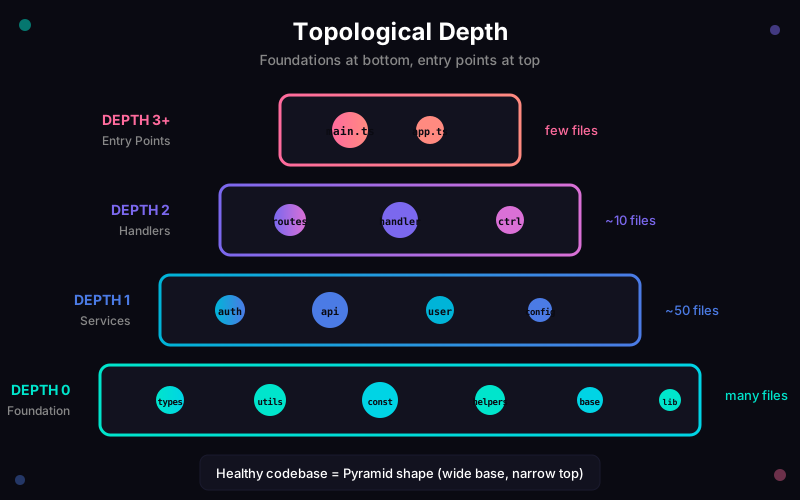
Files are arranged vertically by topological depth—their distance from the foundations of your codebase.
What the Layers Mean
- Bottom (Depth 0): Files that don't import anything from your codebase. These are your foundations—utils, constants, types, helpers.
- Middle layers: Files that build on the foundations. Business logic, services, controllers.
- Top (Highest depth): Entry points—files that import others but nothing imports them. Your
main.ts,App.swift,index.py.
The Pyramid Test
A healthy codebase looks like a pyramid:
- Many small files at the bottom (shared utilities)
- Fewer files as you go up (specific logic)
- Few files at the top (entry points)
An inverted pyramid (wide at top, narrow at bottom) suggests too much logic in entry points and not enough abstraction.
Deep dive: Read The Hidden Hierarchy in Your Codebase for more on how topological depth reveals architectural issues.
Blast Radius
Blast Radius shows the impact of code changes—which files are affected when you modify something.
How to Read It
When viewing a PR or code change, files are colored by their distance from the change:
| Color | Meaning |
|---|---|
| ⚪ White | The changed file itself |
| 🔴 Red | Direct dependents (1 hop) — pay close attention |
| 🟠 Orange | 2 hops away |
| 🟡 Yellow | 3 hops away |
| 🟢 Green → 🩵 Teal | 4+ hops away — lower priority |
| ⚫ Gray | Not affected by this change |
Hot colors = close to change (review carefully). Cool colors = further out (lower risk).
Why It Matters
- Code review: Instantly see what a PR actually touches
- Testing: Focus on files closest to the change
- Surprises: Discover unexpected dependencies before they break production
Example
When you modify validate_token() in auth.rs:
⚪ auth.rs (changed)
   └── 🔴 handlers.rs (calls validate_token)
   └── 🔴 middleware.rs (calls validate_token)
          └── 🟠 router.rs (calls middleware)

4 files affected, max 2 hops
Privacy
Your code is encrypted on your machine before it ever leaves. We cannot see your code.
What We See vs. What You See
| Data | On Your Device | On Our Servers |
|---|---|---|
| Code files | Plaintext | Encrypted blobs |
| Function names | Plaintext | Hashed identifiers |
| File paths | Plaintext | Hashed identifiers |
| Your 12-word phrase | Stored locally | Never sent |
Common Questions
Q: Can you see my code? No. Everything is encrypted with your 12-word phrase before leaving your machine.
Q: What if I lose my mnemonic? Your data cannot be recovered. We have no way to decrypt it. Always backup your 12 words.
Q: Can you see what files I have?
No. File paths are hashed. We see a1b2c3... not src/auth/login.ts.
Supported Languages
CodeLayers parses these languages to build the dependency graph:
| Language | What We Detect |
|---|---|
| TypeScript / JavaScript | import, require, function calls |
| Python | import, from x import, function calls |
| Rust | use, mod, function calls |
| Go | import, function calls |
| Java | import, class references |
| Swift | import, type references |
| C++ / C# | #include / using, namespaces |
| Ruby / PHP | require, include |
Other files (JSON, YAML, Markdown, etc.) are tracked but not parsed for dependencies.