Every codebase has a shape you've never seen.
Not the folder structure. Not the architecture diagram someone drew last quarter. The actual dependency hierarchy—which files are foundations that everything builds upon, and which are leaves that nothing else touches.
We call this topological depth. And once you see it, you can't unsee it.

What is Topological Depth?
The concept is simple:
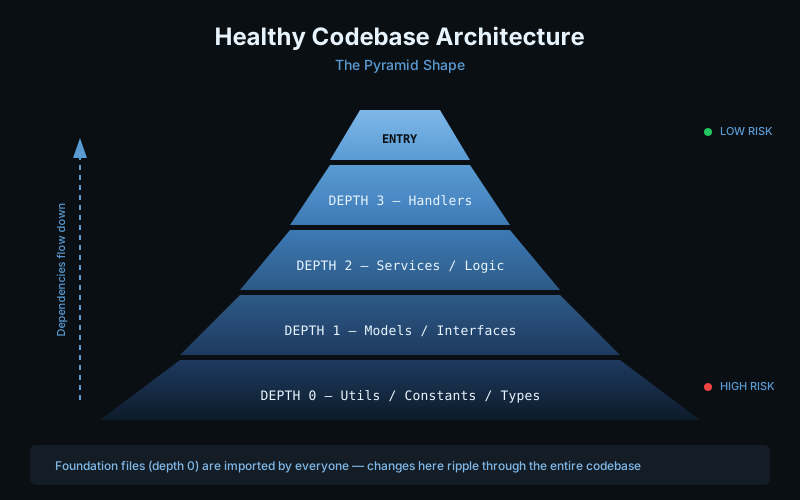
- Depth 0 = Files that don't import anything. These are your foundations—utils, constants, types, helpers.
- Depth N = Files that import depth N-1 files. Each layer builds on the one below.
- Entry points = Files at the top that nothing else imports. Your
main.rs,index.ts,App.swift.
Think of it like geological strata. The deeper you go, the older and more foundational the code. The surface is where the action happens, but it all rests on those bottom layers.
Why Should You Care?
Here's the thing nobody tells you: depth predicts risk.
We analyzed a real PR—number 29,752 in a production codebase. The developer changed 17 files. Sounds reasonable. But here's what the depth visualization revealed:
560 files were affected.
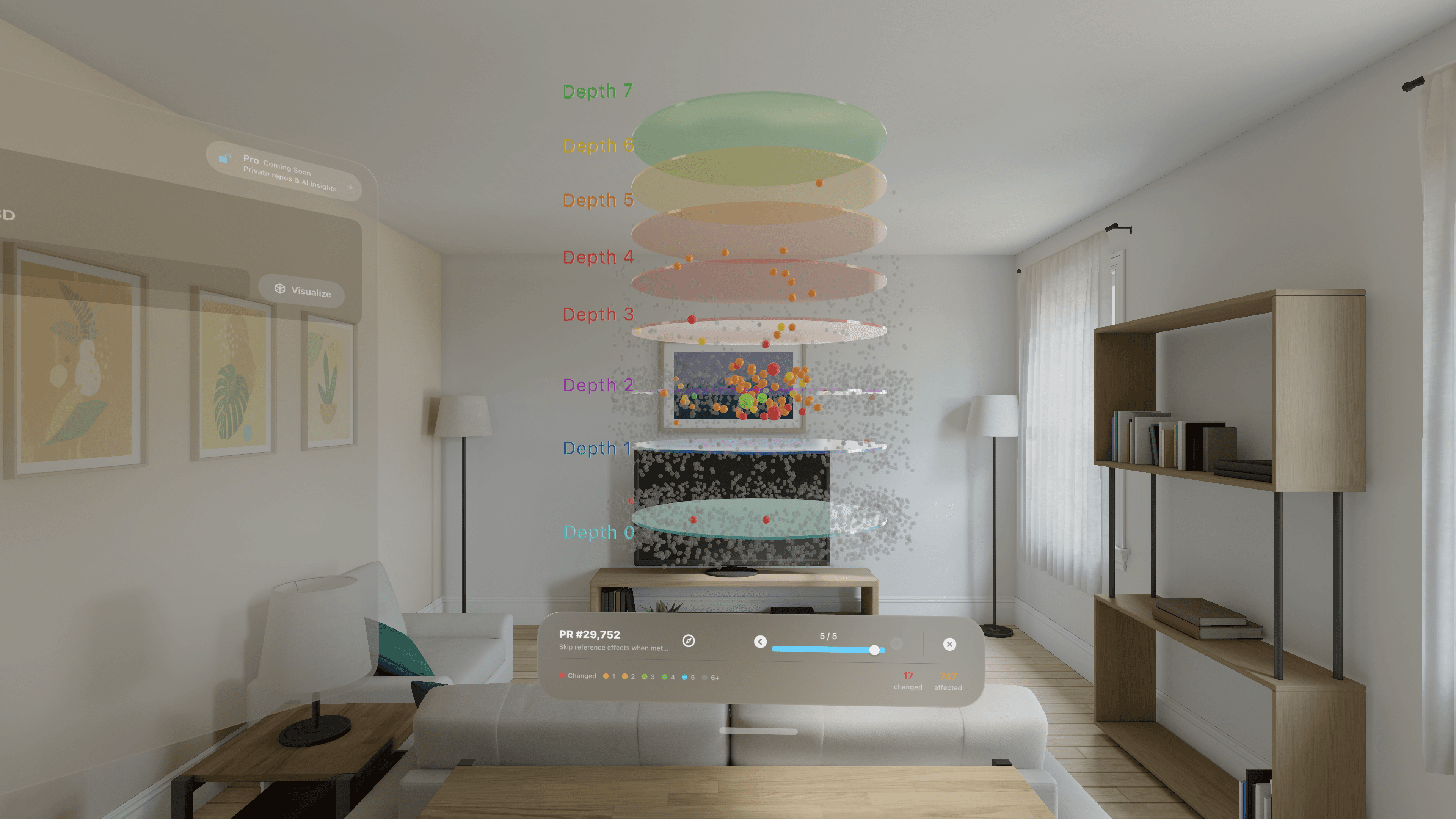
That's a 33x multiplier. One change at depth 0 rippled through the entire codebase.
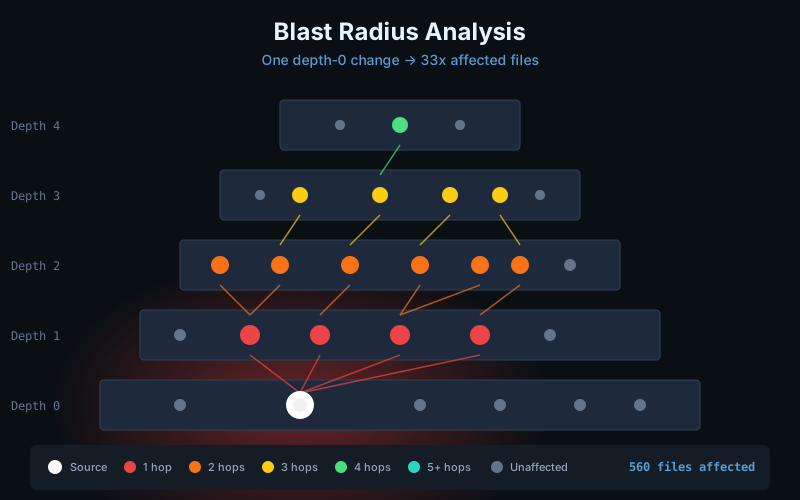
"If you're changing a depth 0 file, you're changing everyone's code."
This isn't theoretical. This is what happens when you modify a utility function that every service imports. Or tweak a type definition that flows through your entire domain model.
The Pyramid Test
A healthy codebase has a pyramid shape:
| Layer | What Lives Here |
|---|---|
| Top (few files) | Entry points, main functions |
| Middle | Controllers, handlers, routes |
| Lower-middle | Services, business logic |
| Near-bottom | Models, interfaces, types |
| Bottom (many files) | Utils, constants, helpers |
Wide at the bottom, narrow at the top. Lots of foundations, few entry points. That's the shape of well-layered code.
But not every codebase looks like this. Here's what different shapes tell you:
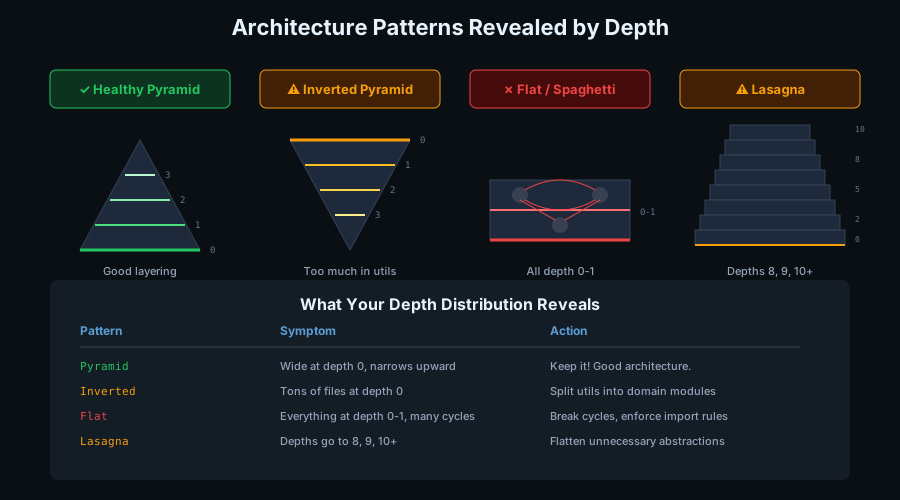
Inverted pyramid = You've stuffed too much into "shared" code. Everything is a util. Time to create domain-specific modules.
Flat (all depth 0-1) = Circular dependencies are preventing layering. Everything imports everything. You have spaghetti.
Lasagna (depths 8, 9, 10+) = Over-engineered. Too many abstraction layers. Flatten some of that indirection.
How We Actually Calculate This
For the curious: here's the algorithm running under the hood.
Step 1: Build the File Graph
We create a directed graph where nodes are files and edges are imports. But here's a subtlety—languages like Swift, C#, and Java often have implicit dependencies. Files in the same module call each other's functions without explicit imports.
We handle this by inferring file-level edges from function calls. If UserService.swift calls a function in AuthService.swift, we add that dependency even if there's no import statement.
Step 2: Handle Cycles
Circular dependencies break naive depth calculation. If auth.rs imports session.rs and session.rs imports auth.rs, which one is deeper?
Neither. They're mutually dependent. We use Kosaraju's algorithm to find these Strongly Connected Components (SCCs)—groups of files where every file can reach every other file through imports.
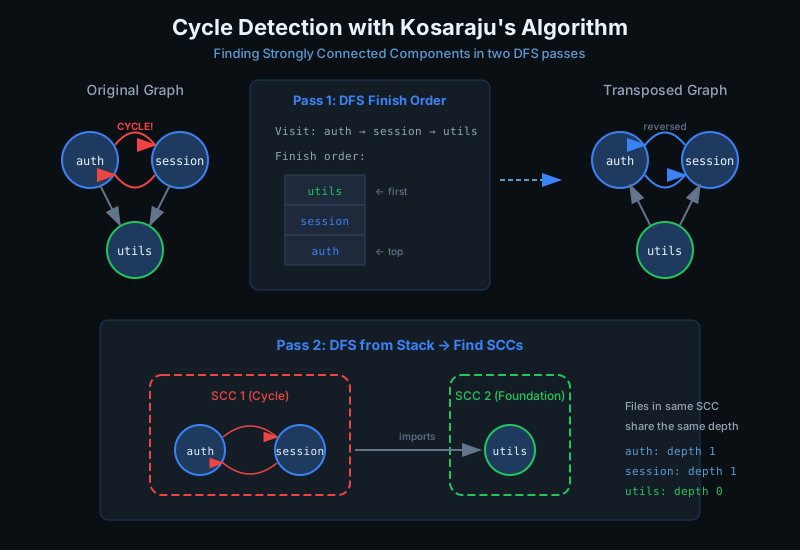
Files in the same SCC get collapsed into a single "super-node" for depth calculation. They share the same depth because they're effectively one unit.
Step 3: Find Foundations
Foundation nodes are files with no outgoing imports—the leaves of your dependency tree. These get depth 0.
We also recognize common patterns: anything in /utils/, /helpers/, /constants/, or /types/ directories gets foundation treatment.
Step 4: Propagate Depth via BFS
Starting from foundations, we BFS upward through the import chain. Each file's depth is the longest path from any foundation—this ensures files are always placed above their dependencies.
Step 5: Bucket for Visualization
Large codebases can have 50+ raw depth levels. We bucket into 8 layers for usable visualization. That's what you see floating in space in CodeLayers.
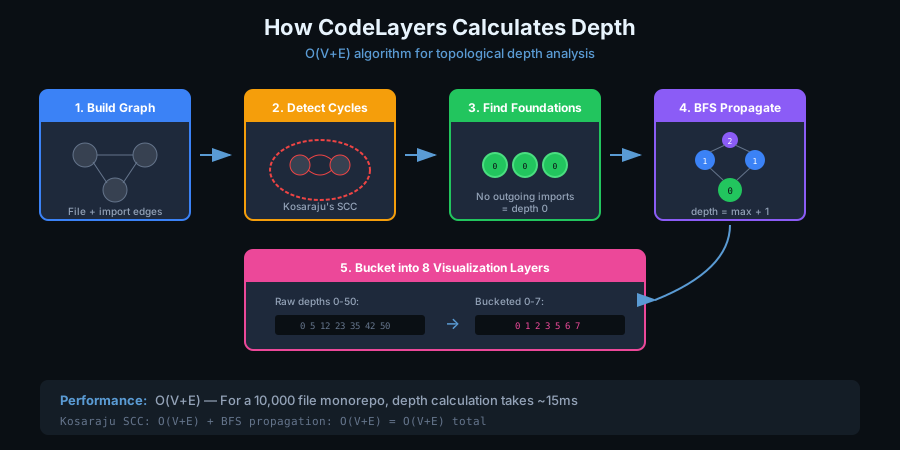
The whole thing runs in O(V+E). For a 10,000-file monorepo, depth calculation takes ~15ms—fast enough for real-time updates.
Practical Applications
Code Review Priority
Not all code changes are equal. Depth gives you a heuristic:
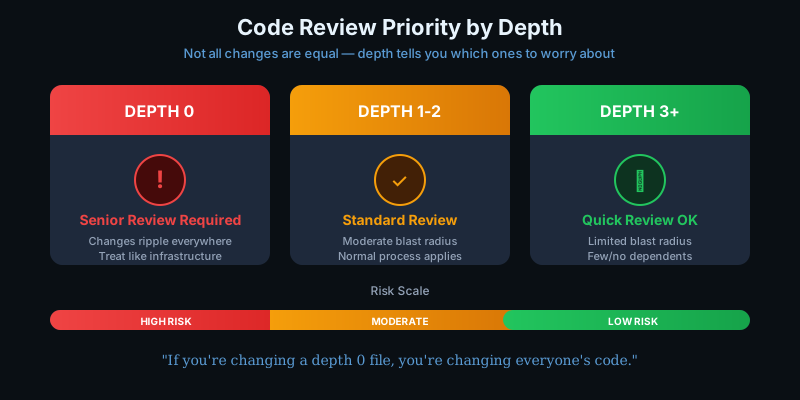
| Depth | Review Intensity | Why |
|---|---|---|
| 0 | Senior review required | Changes ripple everywhere |
| 1-2 | Standard review | Moderate blast radius |
| 3+ | Quick review OK | Limited dependents |
Before merging a PR, check what depths it touches. Depth 0 deserves extra scrutiny.
Onboarding New Developers
Give new team members the depth map. It's a reading order.
Top-down learners: Start at entry points, trace down through imports, end at foundations.
Bottom-up learners: Start at depth 0, understand the primitives, work up to see how it all connects.
Either way, they're not wandering blind through folders.
Refactoring Decisions
Depth reveals refactoring opportunities:
- Huge file at depth 0 = "God file." Split it into focused modules.
- Many files importing the same depth 0 = Heavily shared dependency. Consider if it should be a library.
- High-depth file with many imports = Doing too much. Extract services.
- Cycles at any depth = Architectural confusion. Break the cycle.
The Deeper Insight
Here's something we've noticed: depth correlates with stability.
Lower depth files change less often. They have more dependents, so changes are expensive. Teams naturally protect them.
Higher depth files change more often. Fewer things depend on them, so modifications are safer.
This matches the "Stable Dependencies Principle" from Clean Architecture: depend in the direction of stability. Depth makes that visible.
Treat Depth 0 Like Infrastructure
Our recommendation: treat your depth 0 files the way you treat infrastructure code.
- Changes go through rigorous review
- Backwards compatibility matters
- Breaking changes require migration paths
- Documentation is essential
These files are the bedrock. Everything else rests on them.
Try It Yourself
Next time you're reviewing a PR:
- Ask yourself: what depth is this touching?
- If it's depth 0-1, slow down. Check the blast radius.
- If it's depth 3+, you can probably move faster.
And if you want to actually see your codebase's depth structure in 3D space, floating in your living room—CodeLayers is now available on the App Store. See your codebase's true shape.