Software architecture is spatial. We talk about "layers" of abstraction, "stacks" of technologies, and "trees" of dependencies. But we view all of it on flat 2D screens.
CodeLayers turns your dependency graph into a 3D scene you can explore on iPhone, iPad, and Vision Pro. Files become nodes. Imports become connections. Changes light up downstream impact.
There's a catch with most cloud-based tools: your code goes to their servers. For proprietary codebases, that's a non-starter.
CodeLayers solves this with zero-knowledge architecture. Your code is encrypted on your machine before it ever leaves. Our backend stores only encrypted blobs it cannot read. Not even we can see your code.
Free vs Pro
Free (Explore)
- Visualize any public GitHub repository by pasting a PR URL
- Browse featured community projects curated for exploration
- View your exploration history
- No account required. Just open the app and start exploring
Pro ($7.99/mo or $79.99/yr)
- Sync private repositories from your local machine
- Real-time watch mode — code changes appear instantly in 3D
- AI agents with 14 MCP tools — Claude Code, Gemini CLI, and Codex
- Blast radius analysis — see downstream impact before you make changes
- Zero-knowledge sharing — encrypted web links
- GitHub Action — 3D visualization on every PR
- Git time travel — scrub through commit history
Core Concepts
CodeLayers visualizes your code as a 3D graph. Three color modes show different aspects of your codebase.
Depth Mode
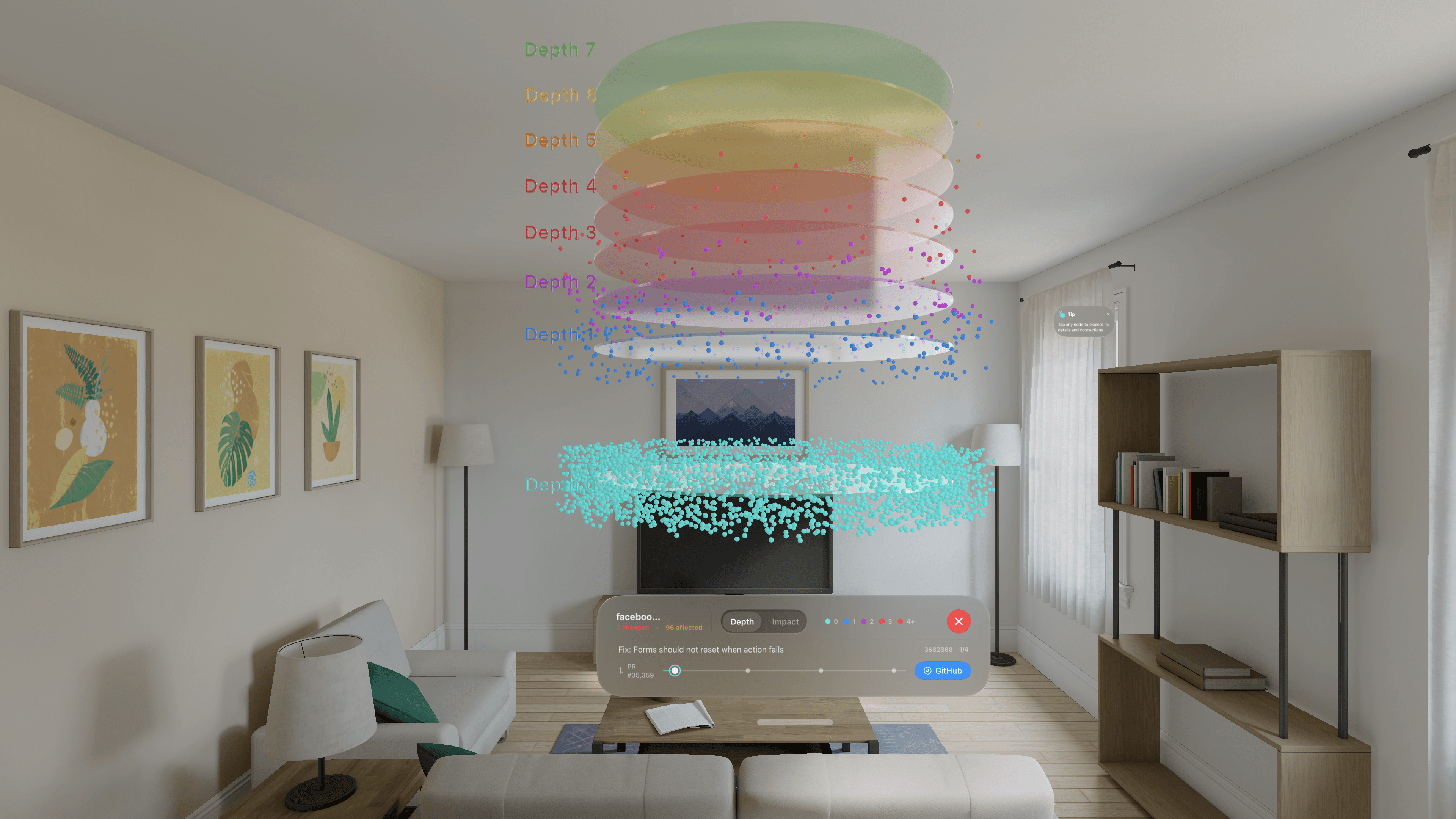
Shows where each file sits in your dependency hierarchy:
- Depth 0 (blue): Foundational files like utilities, constants, and types with no imports
- Higher depths (warmer colors): Files that build on lower-level code
- Entry points (red/orange): Top of the hierarchy, imported by nothing else
A change to a depth-0 file can cascade through hundreds of dependents. Depth mode shows you which files carry the most risk at a glance.
For a deeper dive, read The Hidden Hierarchy in Your Codebase.
Git Mode
Shows your uncommitted changes in real-time:
- Modified files light up as you edit them
- See your work-in-progress before you commit
- Highlights clear automatically when you commit
Impact Mode (Blast Radius)
Shows what else could be affected when you select a file:
- Direct dependents: Files that import the selected file
- Downstream impact: Every file affected transitively, color-coded by hop distance
- Risk assessment: Know the blast radius before making changes
Select any node to see its impact, or watch it update in real-time as you code.
Getting Started: Free Tier
The fastest way to try CodeLayers. No CLI, no account.
Step 1: Download the App
Download CodeLayers from the App Store on your iPhone, iPad, or Vision Pro.
Step 2: Open the Explore Tab
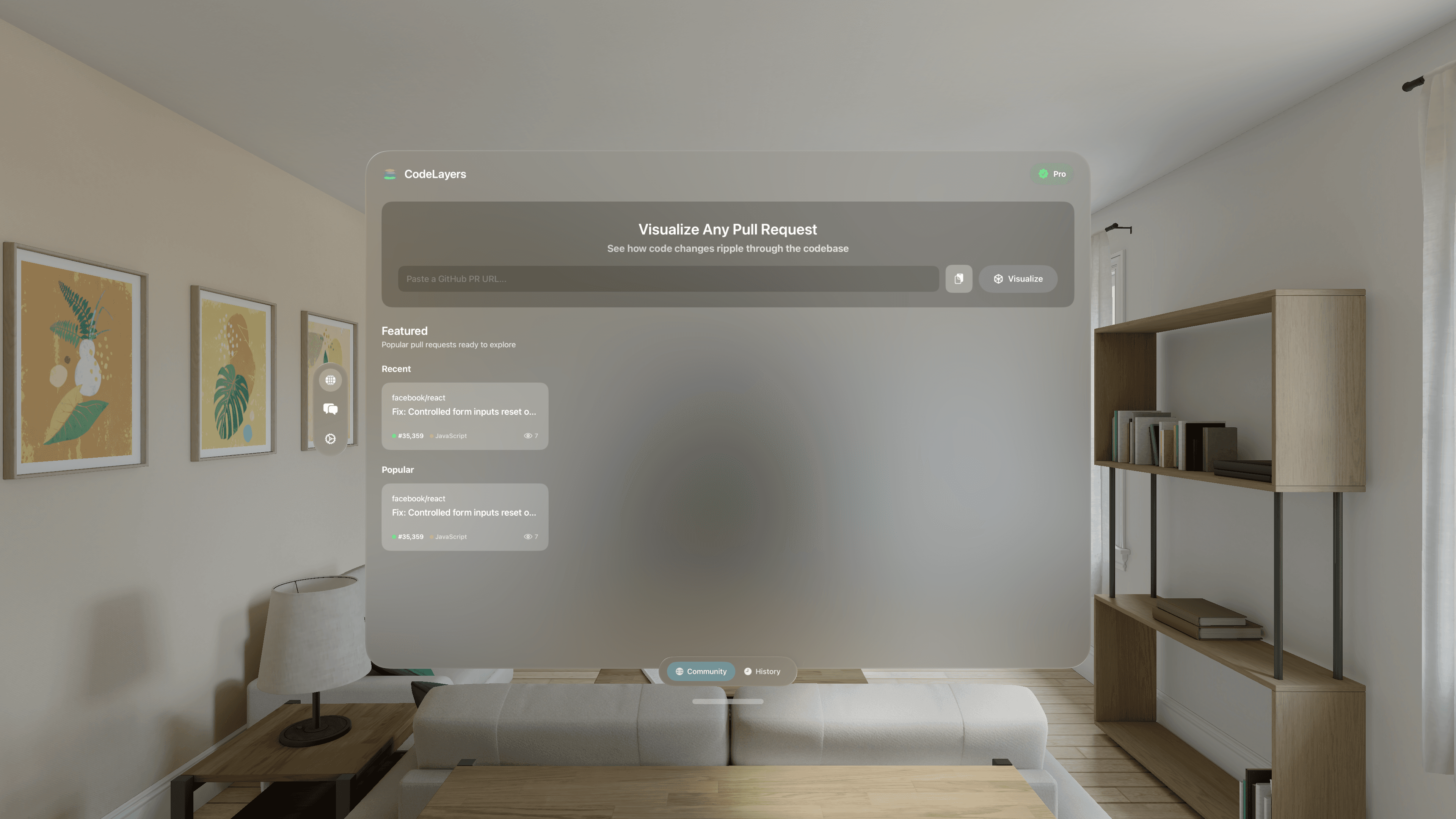
When you launch the app, you'll see the Explore tab.
Step 3: Visualize Any GitHub PR
Paste a GitHub PR URL into the input field. CodeLayers will:
- Fetch the repository
- Parse the code structure
- Build a dependency graph
- Render it in 3D
Within seconds, you're looking at the codebase.
Step 4: Browse Featured Projects
Not sure where to start? The Featured section showcases popular open-source projects ready for exploration.
What You'll See
- Nodes represent files, functions, classes, and modules
- Edges show relationships: imports, function calls, inheritance
- Colors indicate depth in the dependency tree
- Size reflects code complexity and importance
Touch to select nodes, pinch to zoom, drag to rotate. On Vision Pro, use eye tracking and hand gestures.
Upgrading to Pro
Private Repository Sync
Sync any local Git repository to your devices. Your code is encrypted on your machine before transmission. Our backend never sees the plaintext.
Real-Time Watch Mode
Run codelayers watch and every file change appears in your visualization within milliseconds.
Blast Radius Analysis
Before making changes, see exactly what will be affected. Blast radius highlights all files that depend on a given piece of code, color-coded by dependency distance.
How to Subscribe
- Open CodeLayers on your iPhone, iPad, or Vision Pro
- Tap Upgrade to Pro (or go to Settings)
- Choose Monthly or Yearly
- Complete purchase via App Store
- Sign in with Apple to create your account
After signing in, you'll receive a 12-word recovery phrase. This is your encryption key. Write it down and store it securely. It cannot be recovered if lost.
Setting Up the CLI
The CLI runs on your development machine and handles parsing, encryption, and syncing.
Installation
# macOS (Homebrew)
brew install codelayers-ai/tap/codelayers

# Or use the shell installer
curl --proto '=https' --tlsv1.2 -LsSf https://github.com/codelayers-ai/homebrew-tap/releases/latest/download/codelayers-cli-installer.sh | sh
See all releases at github.com/codelayers-ai/homebrew-tap/releases.
Pair with Your Device
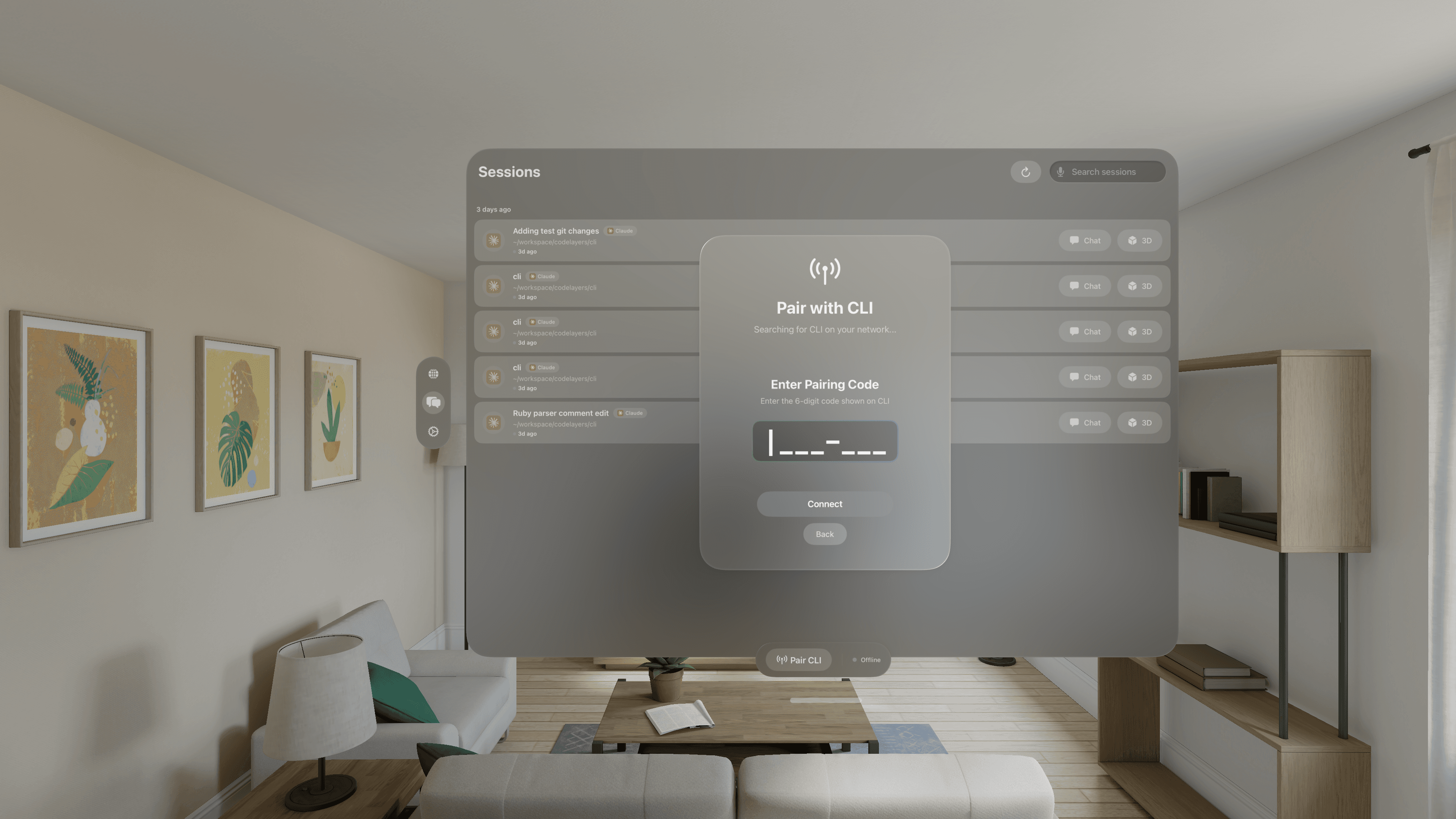
The easiest way to set up the CLI:
codelayers pairThis displays a 6-digit pairing code. On your device, go to the Sessions tab and tap Pair CLI, then enter the code. Encryption keys sync automatically.
Alternative: Login with Mnemonic
Authenticate using your 12-word recovery phrase:
codelayers loginYou'll be prompted to enter your 12 words. This phrase derives your encryption key and never leaves your machine.
Important: If you lose your mnemonic, you lose access to your encrypted data. There is no recovery mechanism. This is the trade-off for true zero-knowledge security.
Verify Your Setup
codelayers statusYou should see:
✓ Authenticated as: [email protected]
✓ Encryption key: derived
✓ Backend: connected
Syncing Your First Repository
Step 1: Run Initial Sync
cd ~/projects/my-awesome-app
codelayers sync .
The CLI will:
- Parse all source files to extract functions, classes, and dependencies
- Build a dependency graph showing how your code connects
- Compute metrics like PageRank and topological depth
- Encrypt everything locally using your recovery phrase
- Upload encrypted data to the backend
For a 1,000-file repository, initial sync typically takes 50-120 seconds.
Step 2: Start Watch Mode
codelayers watch .Each watch command creates a session you can view on any of your devices.
Step 3: View on Your Device
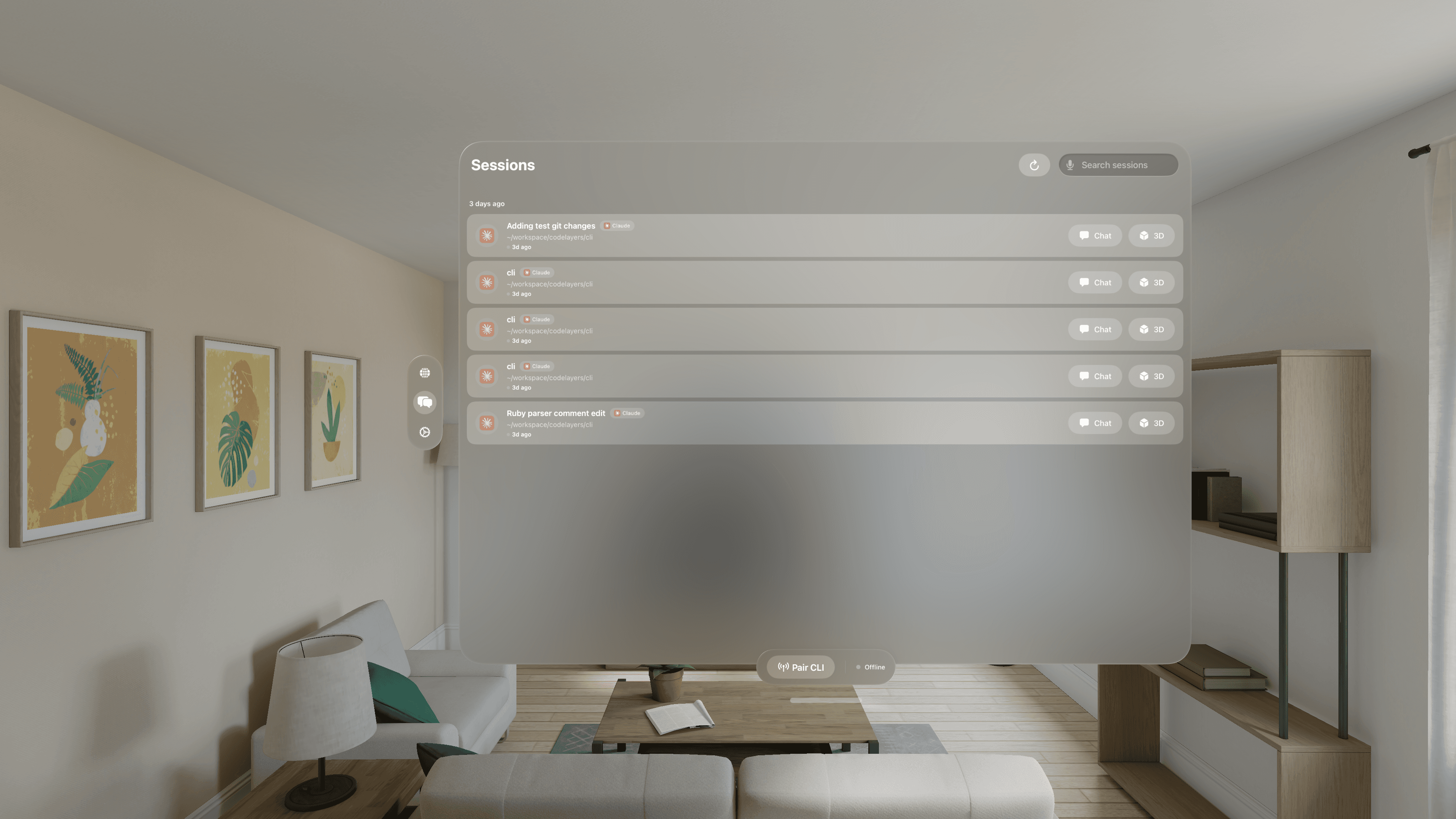
- Open CodeLayers on your iPhone, iPad, or Vision Pro
- Go to the Sessions tab
- Tap your active session to load the 3D visualization
Once running, every file change on your Mac appears in the graph within milliseconds. Switch to Git mode to see uncommitted changes highlighted, or Impact mode to watch your blast radius update as you code.
AI Agent Integration
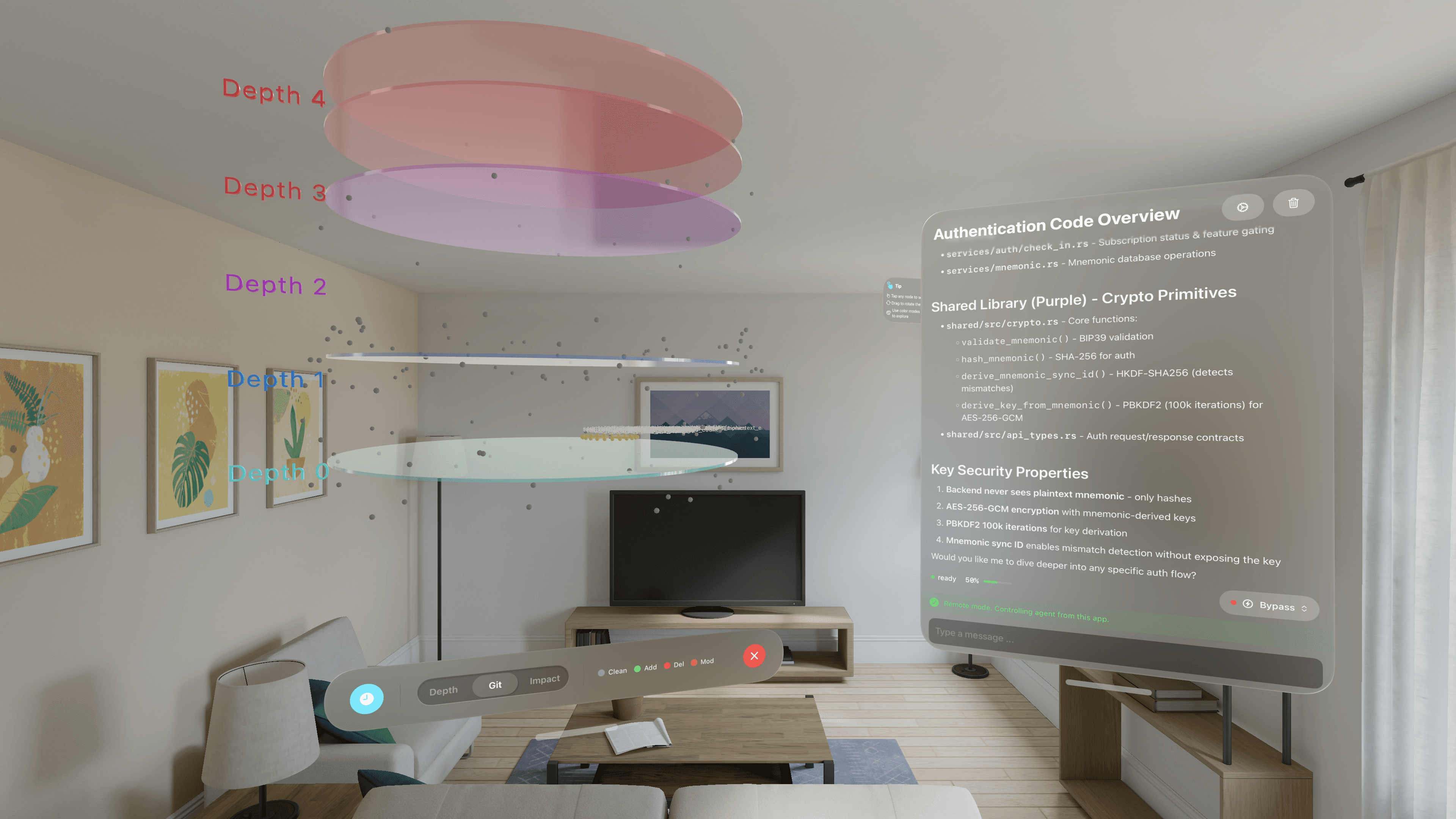
CodeLayers gives AI coding agents architectural awareness through 14 MCP tools. Instead of grepping blindly, your agent searches symbols ranked by how many files depend on them. Instead of reading a 3,000-line file, it gets a structured skeleton using up to 90% fewer tokens.
Starting a Session with AI
codelayers watch . --agent claude| Agent | Flag |
|---|---|
| Claude Code | --agent claude |
| Gemini CLI | --agent gemini |
| Codex | --agent codex |
What the Agent Gets
Search & Intelligence (5 tools):
search_symbols— find functions/classes ranked by architectural importanceget_skeleton— file structure without bodies (up to 90% fewer tokens than reading the file)search_call_chain— shortest path between two functions with metrics at every hoptrace_type_flow— all producers, consumers, and stores of a type across the codebasetrace_variable— declarations, assignment sources, and call sites for a variable
Visualization (7 tools):
create_layer— highlight files in 3D with named, color-coded layersfocus_file— zoom the camera to a specific fileshow_dependencies— draw import lines in the 3D viewget_blast_radius— downstream dependency tree with impact visualizationsave_overlay/list_overlays— persistent highlight sets across sessionsclear_highlights— reset when switching topics
Memory (2 tools):
save_observation— persist insights for future sessionssearch_memory— recall past observations by keyword
Two Operating Modes
Local Mode: You type prompts in your terminal. Your device shows the conversation and visualization updates.
Remote Mode: You type prompts in the app's chat panel. The prompt is encrypted, sent to your CLI, processed by the agent, and the response streams back to your device. Approve file edits from your phone.
Example Conversation
You (in CodeLayers): "Where is user authentication handled?"
Claude: "Authentication is handled in three main files. Let me highlight them."
The visualization highlights auth/login.ts, middleware/session.ts, and services/user.ts with connecting edges visible.
Claude: "The flow starts in login.ts which validates credentials, creates a session via session.ts, and persists user state through user.ts. Want me to show the blast radius if we modify the session middleware?"
For full documentation on all 14 tools, see the AI Agents docs.
VS Code Extension
Don't need 3D visualization? The CodeLayers Blast Radius extension for VS Code and Cursor shows the impact of your changes right in the editor.
code --install-extension codelayers.codelayersWhat you get:
- Sidebar tree of every affected file, organized by hop distance from your change
- File explorer badges (
~1,~2,~3) showing dependency distance - Editor gutter decorations with colored borders on affected lines
- CodeLens annotations showing caller count above functions
- Status bar with total affected file count
Save a file, see the blast radius. No account needed. Runs entirely on your machine.
For the full story, read See the Blast Radius of Every Code Change — Now in VS Code and Cursor.
GitHub Action
Add a 3D visualization to every pull request automatically. Free for open source. No account required.
# .github/workflows/codelayers.yml
name: CodeLayers
on:
  pull_request:

jobs:
  visualize:
    runs-on: ubuntu-latest
    permissions:
      pull-requests: write
    steps:
      - uses: actions/checkout@v4
        with:
          fetch-depth: 0

      - uses: codelayers-ai/codelayers-action@v1
No API key, no sign-up. Every PR gets a comment with an interactive 3D visualization link. Reviewers see blast radius, dependency graph, and code metrics before reading the diff. The comment updates when you push new commits.
For private repos, add an API key (setup guide).
Zero-Knowledge Architecture
Your code belongs to you, and no one else should be able to read it. Not even us.
Unlike cloud services where data is encrypted "at rest" but readable by the provider, CodeLayers uses zero-knowledge encryption:
- Your 12-word mnemonic derives an encryption key locally
- All code is encrypted on your machine before transmission
- The backend stores only encrypted blobs. It has no key
- Decryption happens only on your devices
We cannot read your code. If law enforcement served us with a warrant, we could only hand over encrypted bytes.
What Gets Encrypted
- Graph nodes (files, functions, classes)
- Graph edges (all relationships)
- AI session messages
- File content chunks
- Share and sync data
The Trade-Off
True zero-knowledge means true responsibility. If you lose your 12-word mnemonic:
- Your data is permanently inaccessible
- We cannot recover it for you
- This is by design
Store your mnemonic securely. Use a password manager or physical backup in a safe location.
Tips & Best Practices
Supported Languages
| Language | Extensions |
|---|---|
| Rust | .rs |
| TypeScript | .ts, .tsx |
| JavaScript | .js, .jsx |
| Python | .py |
| Java | .java |
| Go | .go |
| C++ | .cpp, .hpp, .cc, .h |
| C# | .cs |
| Ruby | .rb |
| PHP | .php |
| Swift | .swift |
Unsupported file types are still synced for viewing but won't have parsed structure.
Large Codebase Tips
- Use
--cleansparingly — incremental syncs are much faster - Exclude large directories like
node_modules(respects.gitignore) - Initial sync takes time: 50-120 seconds for 1,000 files is normal
- Watch mode is lightweight — only changed files are re-parsed
Troubleshooting
"Encryption key not found": Run codelayers login and enter your mnemonic.
"Device not seeing updates": Ensure the backend WebSocket is connected (codelayers status).
"Sync seems slow": Initial sync parses everything. Subsequent syncs are incremental and much faster.
"Pairing code expired": Codes expire after 5 minutes. Run codelayers pair again.
"AI agent not responding": Ensure the agent CLI (e.g., claude) is installed and in your PATH.
Get Started
- Free: Download from the App Store and explore public repos
- VS Code: Install the extension for blast radius in your editor
- Pro: Subscribe for private repos, AI agents, sharing, and the GitHub Action
Questions? Email us at [email protected] or follow us on Bluesky.